Core Forms v4.7.2 Forms + commerce 20% off with code CFLAUNCH

Build forms. Take payments. Sell digital products. One WordPress plugin.

Build visual or HTML forms, accept payments, and deliver digital products, licenses, and downloads from WordPress. Every feature is included for unlimited sites.

Forms + checkout Products + licenses 14-day refund Unlimited sites
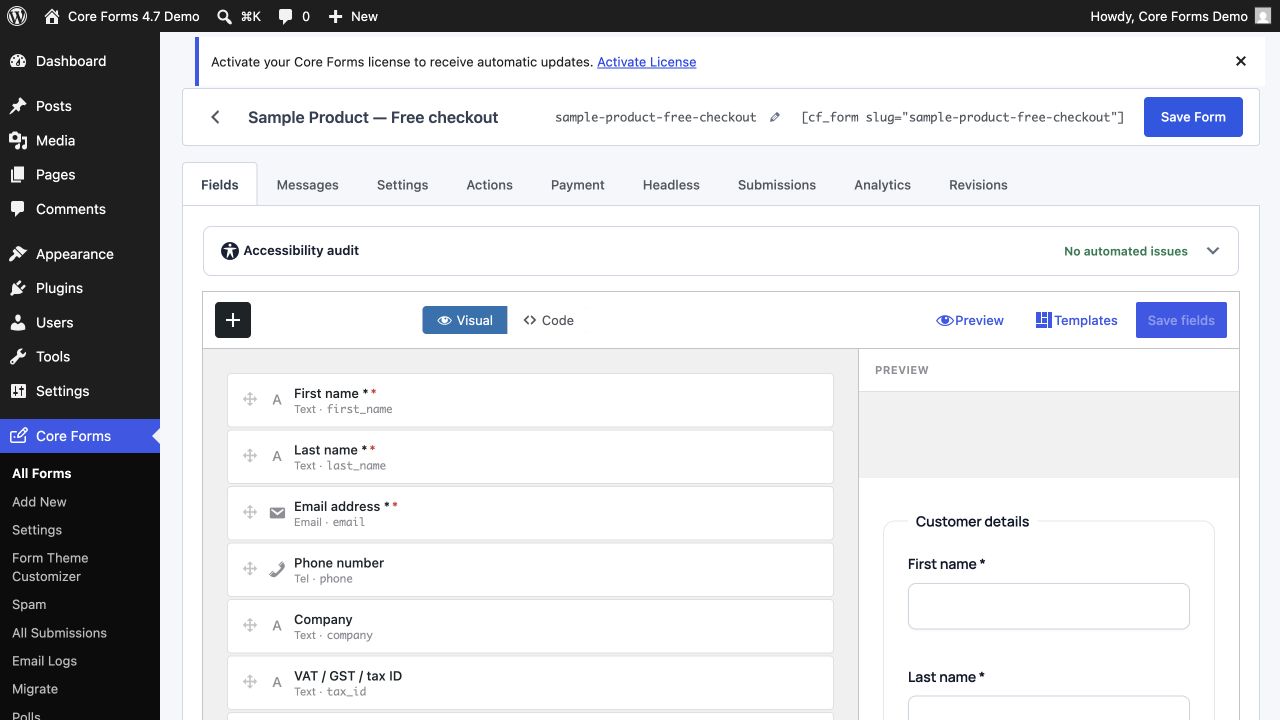
Core Forms visual field builder in the WordPress admin

Built and supported by Gaurav Tiwari

Experienced WordPress Developer & Webperf Advocate 8,000+ active installs across free plugins Indie, lifetime-supported
Watch the walkthrough

See forms and commerce in action

Take the 69-second form-builder tour, then watch the complete commerce workflow from product setup and checkout to orders, licenses, and customer access.

Core Forms: Lightweight WordPress Form Builder Demo See the template gallery, visual and code editors, accessibility audit, form settings, and live embed in 69 seconds.
Core Forms E-commerce Complete Tutorial: Products, Checkout, Orders & Licenses Build the complete store: enable commerce, create products and pricing plans, publish a catalog and checkout, then manage orders and software licenses.

Watch the complete Core Forms playlist on YouTube →

Forms meet commerce

From first field to paid customer

Build the form, route checkout to a gateway that accepts the selected currency, create the order, issue the license or download, and give customers a dashboard. Core Forms keeps that workflow in WordPress without stacking separate add-ons.

Write in HTML or build visually

Use the drag-and-drop field builder or drop in your own HTML — the markup you ship is exactly the markup you get.

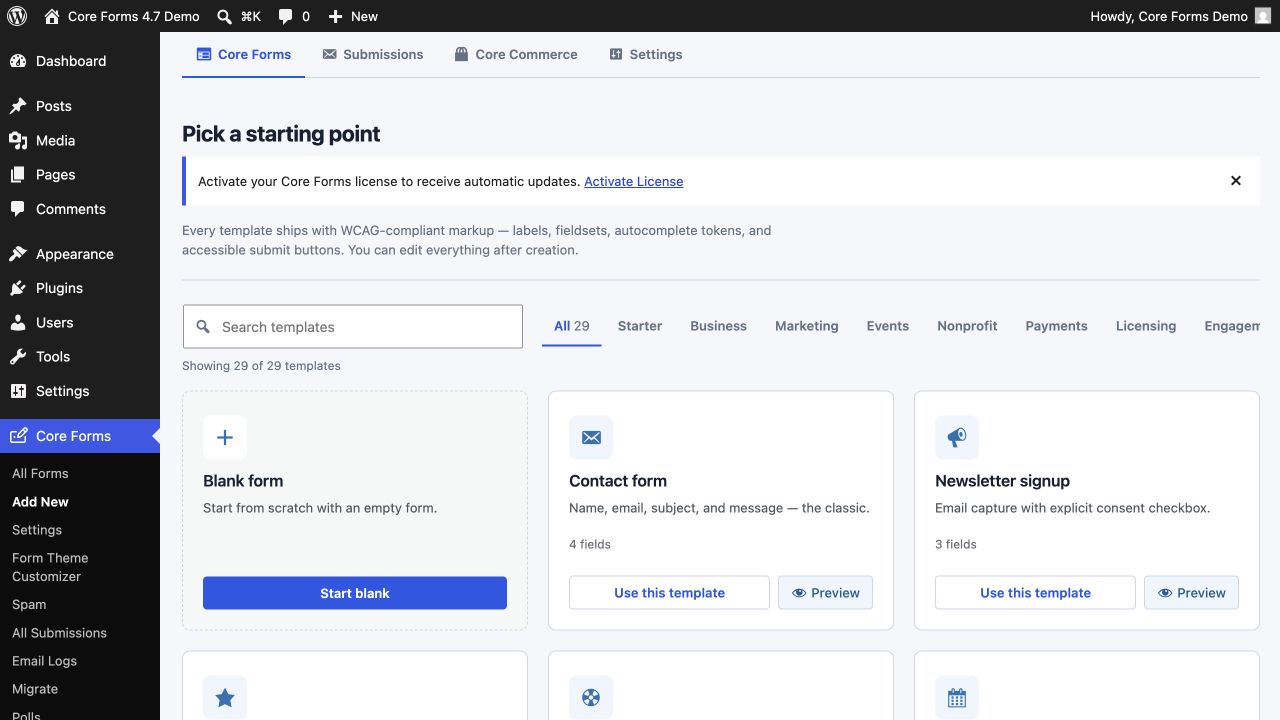
18 accessible starter templates

Pick a starting point — contact, newsletter, RSVP, support, booking, lead capture, six payment-ready templates — and ship in under a minute.

AJAX submissions

No page reloads, no bloat. A single small JS file handles validation, submission, and success states.

Gutenberg block + shortcode

Insert forms with the native Gutenberg block, or anywhere shortcodes work with [cf_form slug="your-form"].

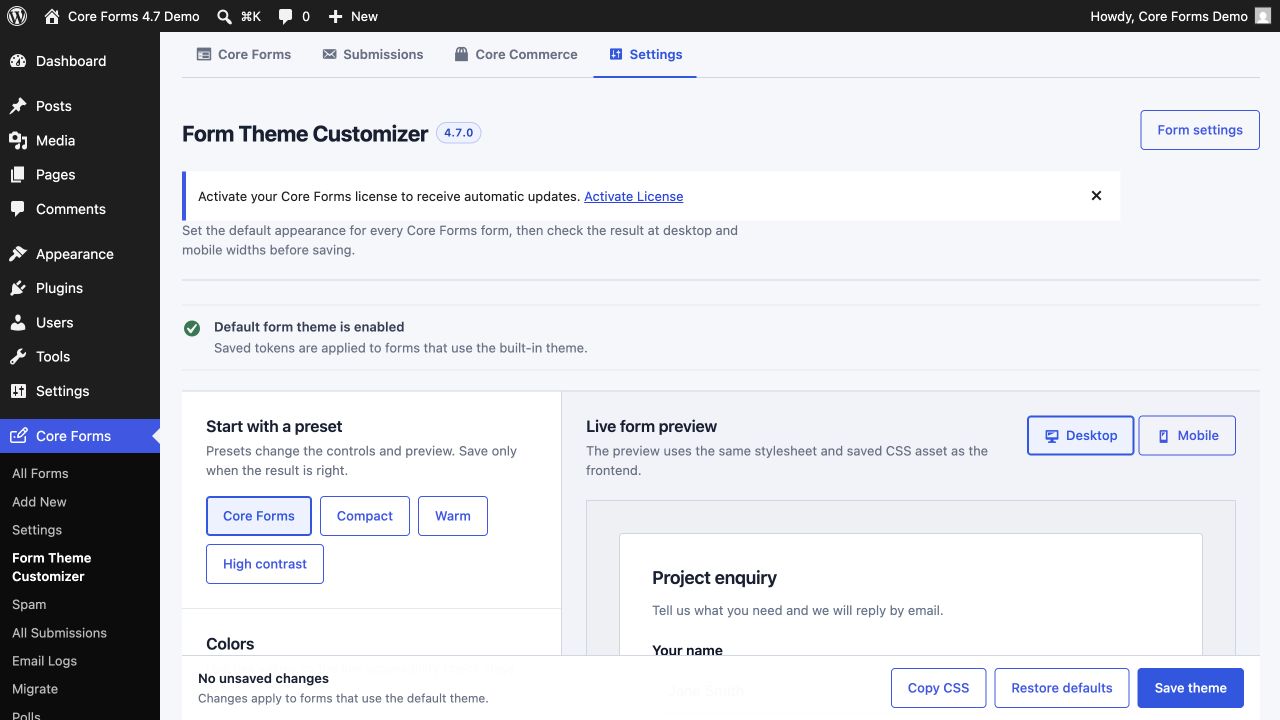
Form Theme Customizer

Tune the default form theme with presets, real design tokens, desktop/mobile preview, accessibility checks, and a generated cache-safe CSS asset.

Fullscreen forms (Typeform-style)

Show one question at a time, full-bleed, with smooth animations and a progress bar. No third-party redirect, no per-response pricing.

Conditional fields & actions

Show, hide, and skip fields or actions based on values with simple data-show-if attributes.

Data variables

Use {{user.email}}, [field_name], {{post.ID}} and URL params in forms, emails, redirects and webhooks.

File uploads

Let users attach files out of the box — per-field size limits, allowed types, storage controls. No add-on needed.

Spam protection stack

reCAPTCHA v3, hCaptcha, Cloudflare Turnstile, Akismet, honeypot, and math captcha. Mix and match per form.

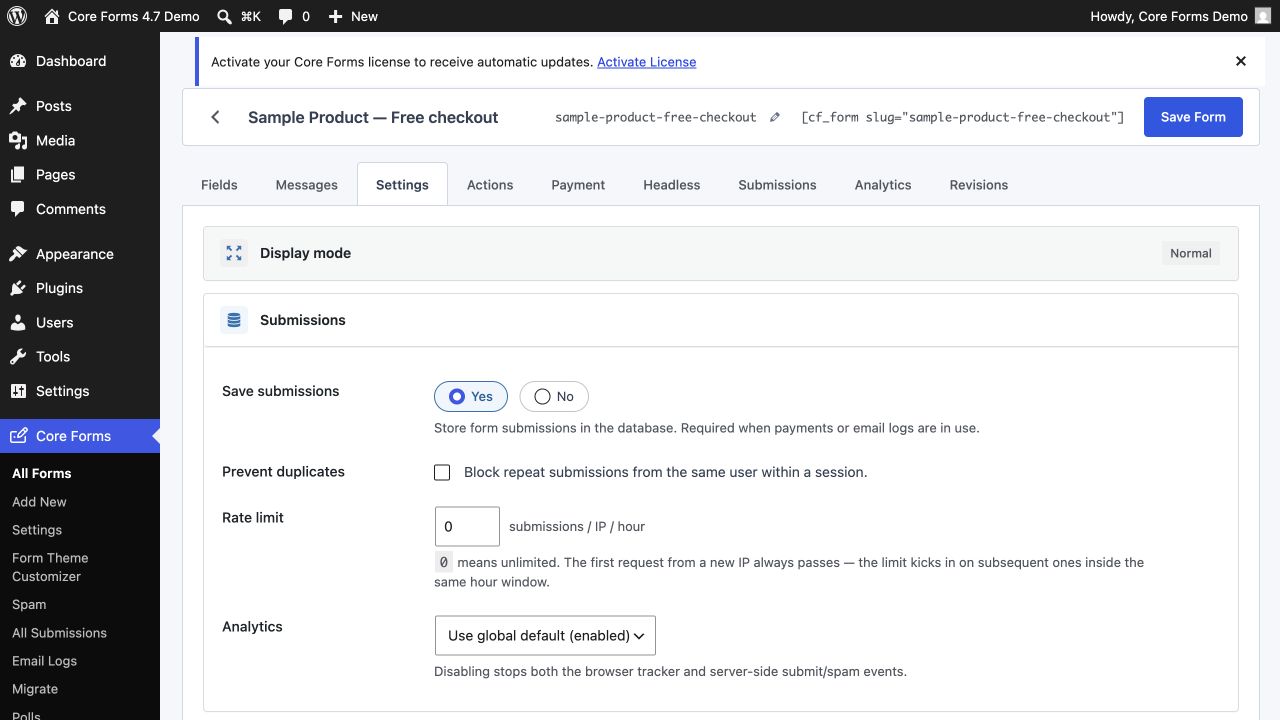
Rate limiting & submission caps

Cap submissions per IP per hour, total submissions per form, or block duplicates within a session.

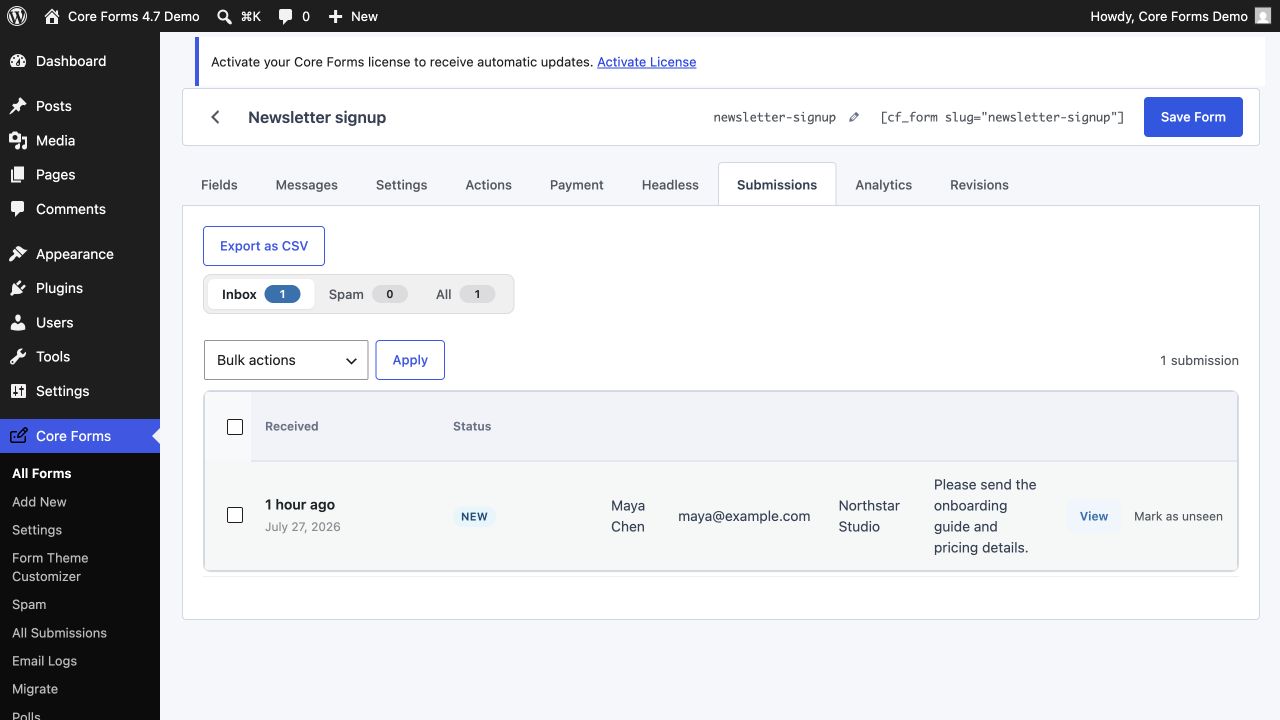
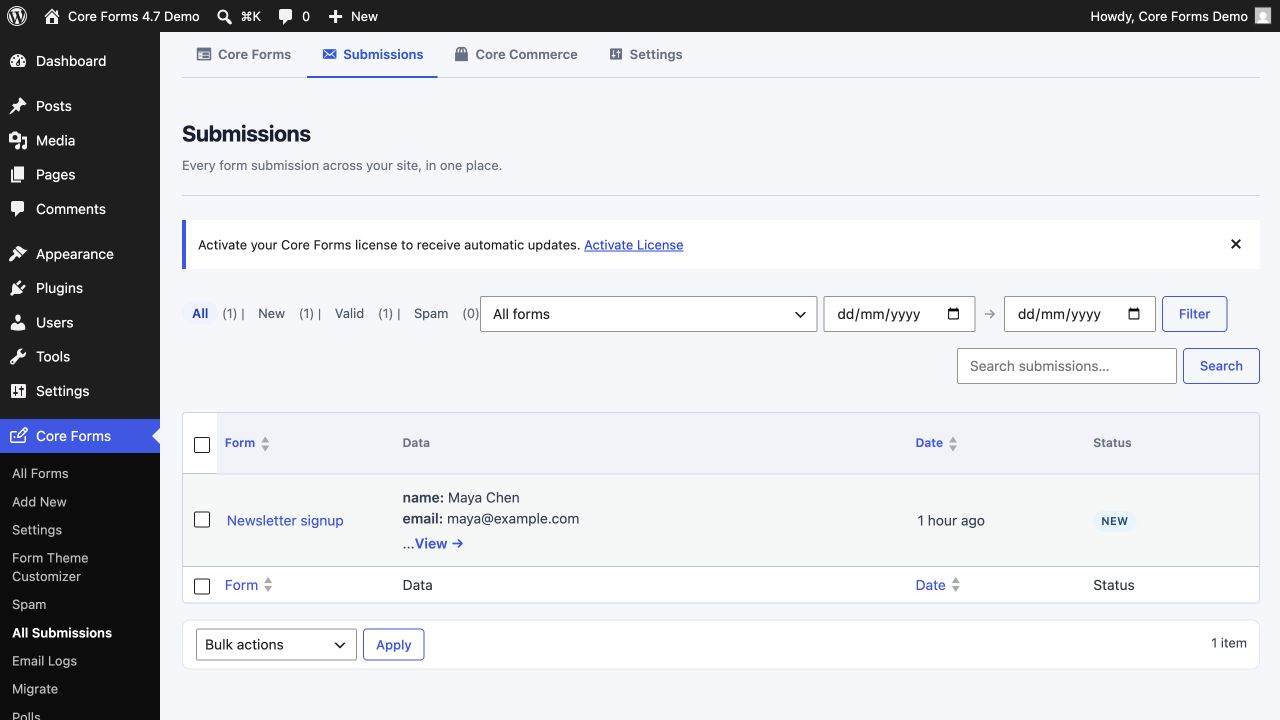
Submissions inbox

Read, reply, archive and search submissions in WordPress. New, read, replied, archived workflow.

CSV export & email logs

Export any submissions table to CSV. Track email delivery with a built-in email log.

Selective backup, restore, and migration

Move the Core Forms data you choose between WordPress sites, or bring forms across from six established form plugins.

Save & resume drafts

Long forms? Let users save progress and return via a unique link. Drafts auto-expire so they do not pile up.

Emails & auto-responders

Send rich HTML notifications and automated replies with field merges, conditional logic, and email logs.

Webhooks & REST API

Pipe form data to any external service. Manage submissions programmatically via the WordPress REST API.

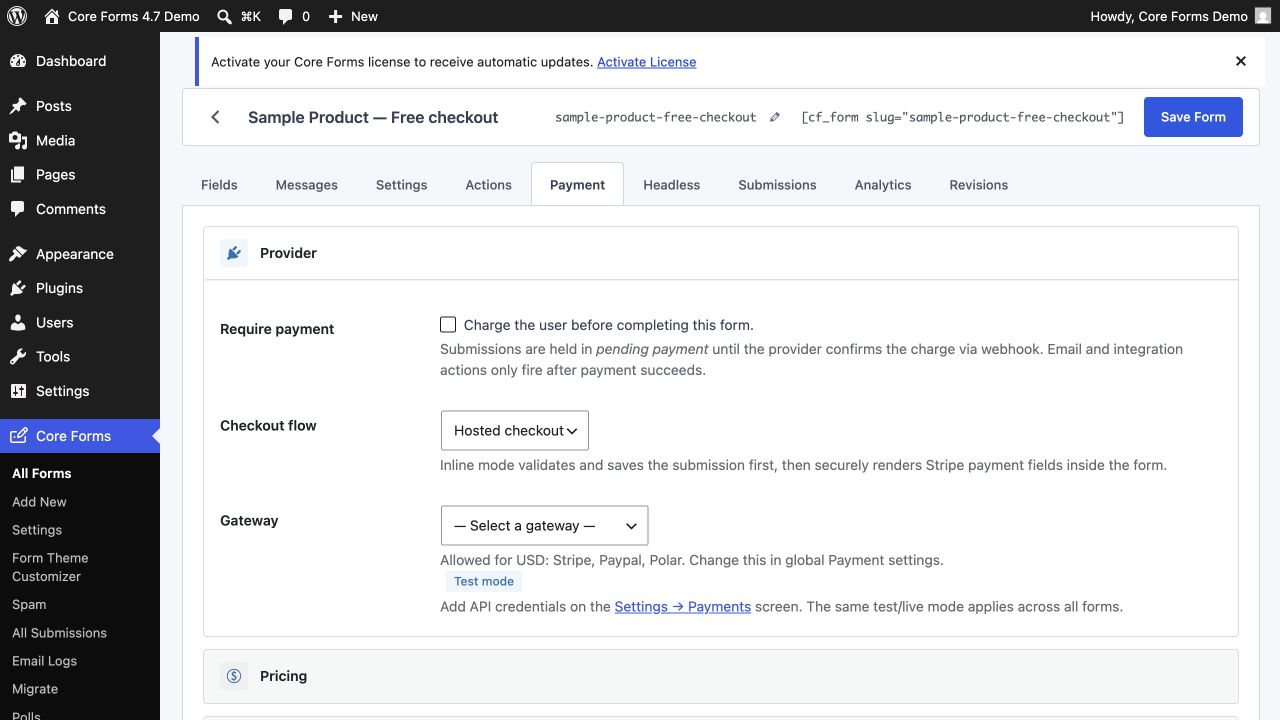
Take payments on submission

Stripe, PayPal, Razorpay, Polar and FluentCart — connect once globally, then flip a per-form toggle.

Sell products & issue licenses

Turn WordPress into a lightweight license server: products, plans, orders, license keys, signed downloads, and a customer dashboard.

FluentCart hosted checkout

Hand a form submission off to FluentCart's checkout for products and subscriptions, on free or Pro.

Mailchimp, MailerPress, FluentCRM + 25 more

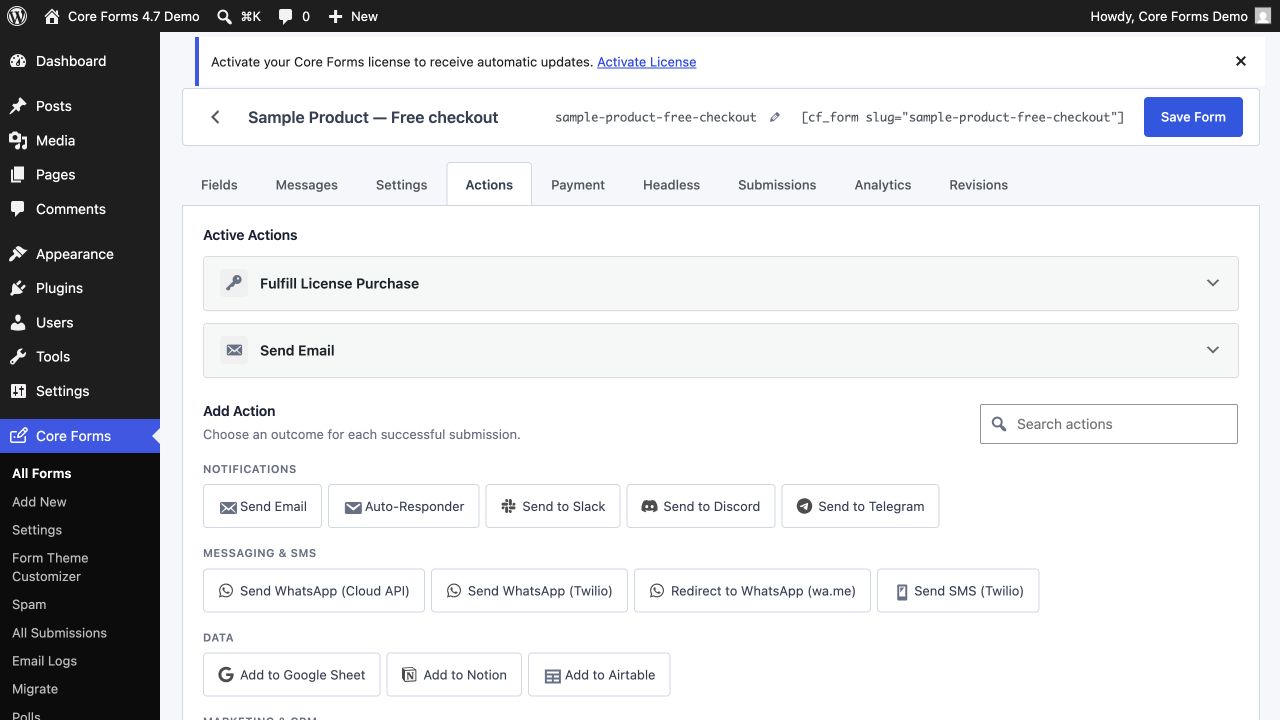
Subscribe form users to lists, push to CRMs, post to Slack/Discord, drop into Notion or Airtable, fire Zapier or Make.

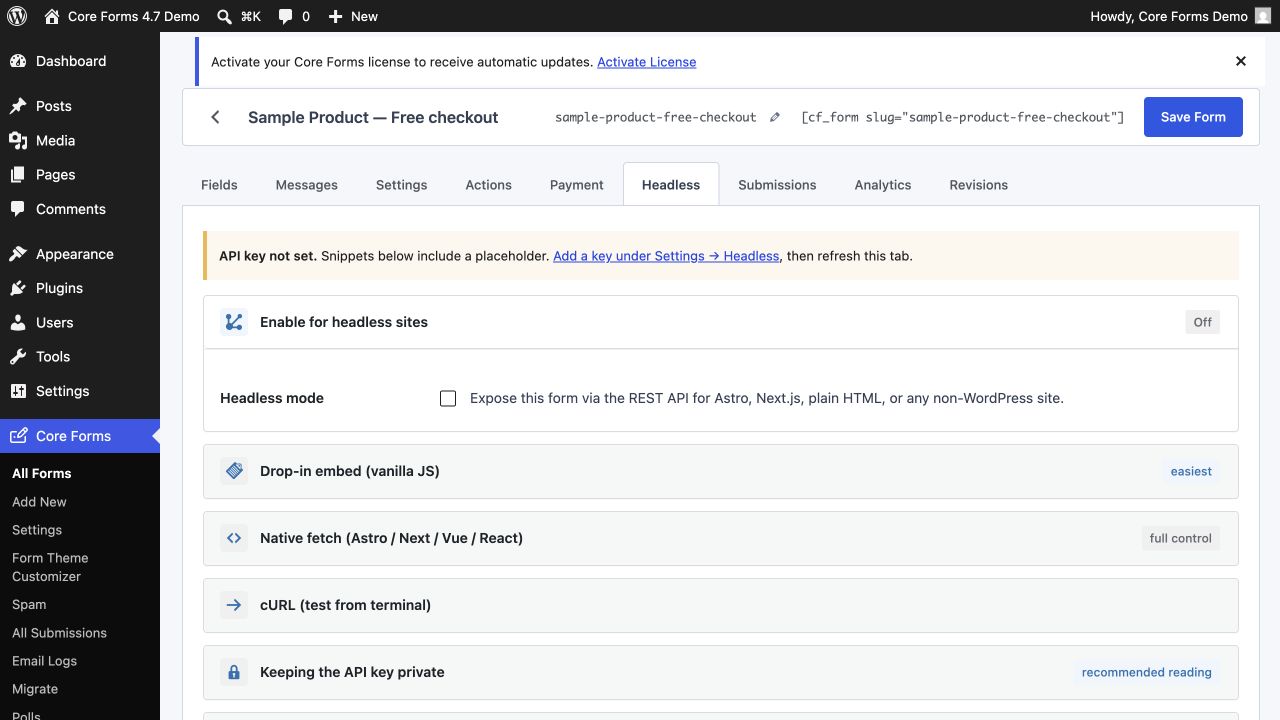
Headless / REST submissions

Render and submit forms from Astro, Next.js or any non-WordPress site. Site-wide API key + drop-in widget.

Form scheduling

Open and close forms by date, day-of-week and time-of-day. Overnight windows supported.

Form analytics and drop-off

Measure views, starts, completions, conversion rate, field drop-off, and attribution without sending form data to a third party.

WCAG 2.2 accessibility

Every starter template ships WCAG-compliant — labels, fieldsets, autocomplete, aria-required. Forms work for everyone.

Built-in polls

Quick yes/no or multi-option polls with vote storage, single-vote-per-IP, and results visualization.

Plays well with others

Every integration you need, built in

Core Forms ships with first-class support for the services WordPress site owners actually use. No Zapier workarounds, no premium add-ons — wire up email, CRM and spam protection in minutes.

Browse all integrations →

Plus anything else via webhooks and the REST API — Zapier, Make, n8n, Slack, Discord, Airtable, Notion, your custom Laravel app. If it speaks HTTP, Core Forms can talk to it.

Product tour

Designed to feel like WordPress itself

No unfamiliar dashboards, no second login. Core Forms drops into your WordPress admin and uses the UI patterns you already know.

1 of 10

Core Forms field editor in the WordPress admin
What’s new

Shipping in the open

Core Forms ships small, focused releases — most weeks. Every release is free for existing license holders, forever. Here’s what landed recently.

v4.7.2 Latest August 4, 2026

Per-form Skeleton CSS control without forcing a visual theme

  • Added a per-form Skeleton CSS control with options to inherit the global setting, always load forms.css, or always skip it.
  • The form-editor preview now follows the same resolved Skeleton CSS and default form-theme settings as the frontend.
  • Existing forms keep their current behavior unless a per-form Skeleton CSS override is selected.
Full notes on the changelog →
v4.7.1 July 28, 2026

Standalone and fullscreen forms keep their complete responsive design baseline

  • Fixed standalone and fullscreen form pages rendering browser-default controls when the global or per-form built-in theme was disabled.
  • Standalone routes now always load the Core Forms design baseline and generated theme-token overrides because the active WordPress theme is not rendered on those pages.
  • Made the default form theme depend on the core form stylesheet and added regression coverage for standalone asset loading.
Full notes on the changelog →
v4.7.0 July 27, 2026

A calmer admin, a real theme workflow, portable data, and a complete Core Commerce customer workspace

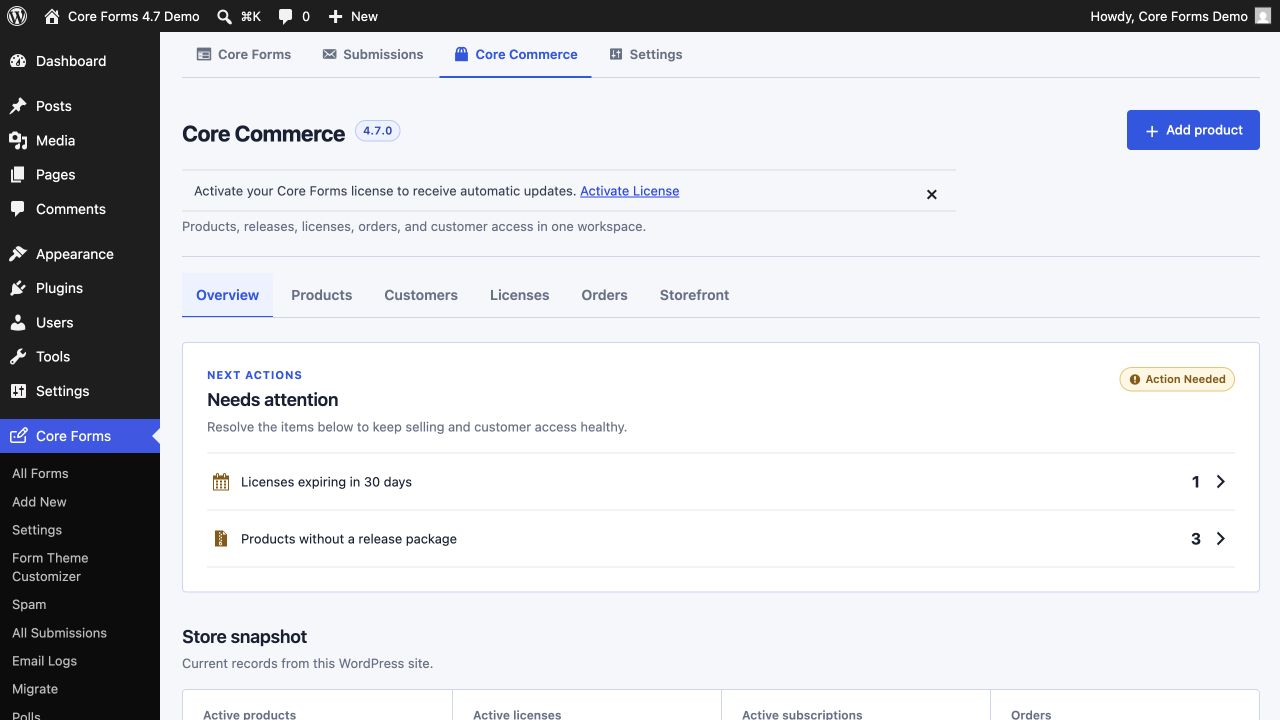
  • Unified Core Forms, Submissions, Core Commerce, and Settings under one compact product navigation, with contextual actions, responsive controls, persistent save bars, and a searchable action library.
  • Added a dedicated Form Theme Customizer with four presets, live desktop/mobile preview, accessibility checks, copyable CSS, and automatic regeneration of a cache-versioned frontend CSS asset.
  • Added selective portable JSON export and import for forms, submissions and replies, polls and votes, settings and theme tokens, activity and analytics, and all Core Commerce records with destination-safe relationship remapping.
  • Rebuilt Core Commerce around operational next actions, product readiness, store totals, recent activity, guided product setup, and a task-oriented Storefront workspace.
  • Added a case-insensitive Customers view that combines each buyer’s orders, licenses, active sites, and latest activity.
  • Added product-specific Block Editor and shortcode guidance, copy controls, and clear instructions for creating a single-product page when and where the site owner chooses.
  • Replaced the all-submissions card grid with a searchable, sortable table and improved form lists, selects, checkboxes, settings screens, and narrow-screen builder behavior.
  • Fixed starter-template previews resolving as unknown, aligned the Warm preset with frontend output, corrected LTR select arrows, and prevented host themes from enlarging Core Forms help text.
Full notes on the changelog →
v4.6.3 July 27, 2026

More reliable validation, licensing, headless submissions, and clearer Core Forms administration

  • Renamed the Forms dashboard to Core Forms, added the installed version beside the heading, and renamed Products & Licensing to Core Commerce across the admin workspace.
  • Fixed required and email validation for schema and legacy forms, repaired same-name choice groups and empty select placeholders, and stopped invalid submissions from reaching the inbox or consuming the successful-submission rate limit.
  • Fixed headless REST errors returning HTTP 200, restored submissions when nonce enforcement is enabled, normalized array fields, and preserved canonical field descriptions and grouped options.
  • Fixed Emailit v2 sends and contact subscriptions being marked as failed when the API correctly returns HTTP 200.
  • Made license activation records self-healing during normal heartbeats, added canonical site and runtime metadata, retried transient activation failures, and kept the local key when remote deactivation fails.
  • Removed the redundant one-page Core Commerce table footer and its misplaced card treatment while preserving real multi-page navigation.
Full notes on the changelog →

View the full changelog → See what’s shipping next →

Simple pricing

Two ways to buy. Both unlimited.

Same plugin, same features, same support — pick the cadence that suits you. Every plan covers unlimited sites, every premium feature, and a 14-day no-questions refund.

20% off Public launch offer — apply code CFLAUNCH at checkout.

Yearly

Lower entry price · renews annually

$59 / year

$59 $47/yr with code CFLAUNCH

  • Unlimited sites — personal & client
  • Every premium feature included — no add-ons
  • All integrations: Mailchimp, MailerPress, FluentCRM, Emailit, HubSpot…
  • Submissions inbox, replies, exports, email logs
  • reCAPTCHA v3, hCaptcha, Turnstile, Akismet
  • Updates and priority email support while subscribed
  • 14-day money-back guarantee
Get Yearly — $59/yr →

per year · renews annually

Both plans include every integration on this site, every premium feature, and unlimited sites. Switching plans later? Email us — we’ll prorate.

Gaurav Tiwari, creator of Core Forms, at work
Built by Gaurav Tiwari

An indie developer and web performance advocate.

I’m Gaurav — I’ve been building with WordPress since 2008, shipping free plugins used on 8,000+ active sites, and obsessing over web performance the whole way. I’ve worked with companies like IBM, Adobe, HubSpot, Monday and Canva on content and developer tooling, but my favorite thing is still sitting down and shipping small, fast, honest software.

Core Forms is a forms plugin I wanted for myself: no add-on upsells, no bloat, a codebase I’d be happy to read, and an admin UI that feels like WordPress. Buy it and you’re supporting indie software — and you’ll always reach me personally for support at gaurav@gauravtiwari.org.

More free plugins

My other WordPress plugins on WordPress.org

Free, lightweight, actively maintained. Try any of these alongside Core Forms — they play nicely together.

Dynamic Month & Year into Posts

Dynamic shortcodes for dates, years, months, age calculations, seasons and countdowns — in content, titles and meta.

8,000+ active installs
View on WordPress.org →

GT Link Manager

Fast, free branded link manager with custom DB tables, early redirects, CSV import/export and block editor integration.

100+ active installs
View on WordPress.org →

Dynamic Functionalities

Replace 5+ plugins with one lightweight toolkit. 16 modules for performance, security, SEO, redirects and content management.

Fresh release
View on WordPress.org →

Formatting Extender

Extends the Block Editor formatting toolbar with inline controls — badges, highlights, and more.

Free on WordPress.org
View on WordPress.org →

Beautiful Recent Posts Widget

A clean, minimal sidebar widget to showcase your recent articles in a beautiful way.

Free on WordPress.org
View on WordPress.org →
Questions?

Frequently asked

Do I have to buy add-ons for file uploads, webhooks or Mailchimp?
No. Every premium feature — file uploads, webhooks, Mailchimp, MailerPress, Emailit, submission limits, logged-in forms, data management — is bundled with your purchase. One price, everything included.
How many sites can I use it on?
Unlimited. Both the Yearly and the Lifetime plan cover every personal and client site, with no per-site activation count.
What’s the difference between Yearly and Lifetime?
Both plans give you the exact same plugin, every premium feature, every integration, and unlimited sites. Yearly ($59/year) renews annually and is the lower-friction way to start. Lifetime ($249 one-time) is a single payment, every update forever, no renewals — it pays for itself after about four years vs. Yearly. Pick whichever fits your cashflow.
Is there a discount?
Yes — use code CFLAUNCH at checkout for 20% off either plan. That brings Yearly to $47/year and Lifetime to $199 once.
What’s your refund policy?
14 days, no questions asked. If Core Forms isn’t the right fit, email us and we’ll refund you — no forms to fill out.
Can my forms take payments?
Yes. Connect Stripe, PayPal, Razorpay, Polar.sh, or FluentCart under Settings → Payments. A form can charge a fixed or customer-entered amount, while product checkout can route each currency to one or more compatible gateways. Paid actions run only after the gateway confirms payment.
Can Core Forms replace WooCommerce?
Core Forms can replace a larger store plugin when you sell paid submissions, digital downloads, plugins, themes, or software licenses. Use WooCommerce for physical inventory, shipping, complex tax rules, marketplaces, or a large retail catalog. Core Forms can also hand a submission to WooCommerce or FluentCart when those systems are the better fit.
Does Core Forms work with FluentCart?
Yes — Core Forms hands form submissions off to FluentCart’s checkout for any product variation, free or Pro, one-time or subscription. Address fields collected on the form prefill the FluentCart checkout (and feed its tax engine), and paid orders flip the submission to <em>paid</em> automatically through fluent_cart/order_paid_done.
Can I use Core Forms on Astro, Next.js or a non-WordPress site?
Yes. Set a site-wide API key under Settings → Headless, flip the per-form Headless toggle, and copy a snippet — drop-in vanilla JS widget, native fetch, or cURL. The form renders on your headless front-end and submissions run through the same validation, captcha and action loop server-side in WordPress.
What version is Core Forms on right now?
Core Forms 4.7.2 (August 4, 2026) is the latest release. It adds per-form control over the Skeleton CSS baseline while keeping form-theme styling separate, so embedded forms can inherit the active WordPress theme. The 4.7 line also introduced a unified admin workspace, Form Theme Customizer, portable data migration, redesigned Core Commerce experience, and customer workspace. Full release notes are on the Changelog page.
What are the WordPress requirements?
WordPress 6.4 or higher and PHP 8.1 or higher. Core Forms is built to be lightweight and is tested on the latest WordPress release.
Does it work with block themes and the site editor?
Yes. Core Forms ships a native Gutenberg block, works anywhere shortcodes are allowed, and plays nicely with FSE, Bricks, GenerateBlocks and classic themes.

Build the form and sell the product.

Forms, payments, product checkout, orders, software licenses, and every integration are included for unlimited sites at $59 a year, or $249 once. Use code CFLAUNCH at checkout for 20% off.